> For the complete documentation index, see [llms.txt](https://p0db0t.gitbook.io/pentest/llms.txt). Markdown versions of documentation pages are available by appending `.md` to page URLs; this page is available as [Markdown](https://p0db0t.gitbook.io/pentest/tools/network-enumeration.md).
# Network Enumeration
{% hint style="info" %}
With the range of well-known ports 1 to 1,023 being reserved for **privileged services.** which means to run any service for above port rage you must be a super user(**root**).
And port 0 is treated as a "**wild card**" port.
{% endhint %}
## 00. Networking Basics
* [Transporting packets](https://www.khanacademy.org/computing/computers-and-internet/xcae6f4a7ff015e7d:the-internet/xcae6f4a7ff015e7d:transporting-packets/a/the-problems-with-packets)
```bash
## ------------------| Loopback Alternatives
ping localhost
ping 127.0.0.1
ping 127.1
ping 0x7F000001
ping 0x7f01
ping 2130706433
ping ①②⑦.⓪.⓪.⓪
ping 017700000001
ping 0177.0000.0000.0001
ping 00000177.00000000.00000000.00000001
```
* IPV 6
```bash
## ------------------| Common
fe80::c2d9:184f:9f41:3c8d <==> fe80:0000:0000:0000:c2d9:184f:9f41:3c8d
## ------------------| Subneting
fe80::/10 - Unique Link-Local (169.254.4.x)
## fe80:0000:0000:0000:0000:0000:0000:0000
## febf:ffff:ffff:ffff:ffff:ffff:ffff:ffff (mask)
fc00::/7 - Unique Local-Unicast (10.x.x.x, 172.16.x.x, 192.168.x.x)
## fc00:0000:0000:0000:0000:0000:0000:0000
## fdff:ffff:ffff:ffff:ffff:ffff:ffff:ffff (mask)
2000::/3 - Global Unicast
## 3fff:ffff:ffff:ffff:ffff:ffff:ffff:ffff (mask)
FF02::1 - Multicast All Nodes
FF02::2 - Multicast Router Nodes
```
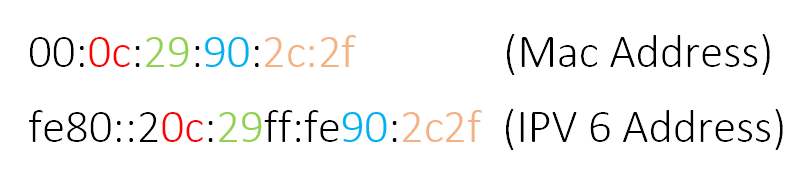
* Calculate `Link-Local` IPV6 Address Using Mac
```bash
### Get MAC address
arp -n
ping 10.10.10.20
arp -n
## Calculate like below 👇👇👇
```
 * Enumerate Network by ping multicast | `atk6-alive6`
```bash
## ------------------| Manual
# Check arp cash
arp -n
# ip-neighbour
ip -6 neigh
# Ping to multicast
ping6 -I eth0 ff02::1
# Check ip-neighbour again and arp cash
ip -6 neigh
arp -n
## ------------------| atk6-alive6
which atk6-alive6 <-- copy this binary to remote machine
atk6-alive6 -e ff02::1
ip -6 neigh
```
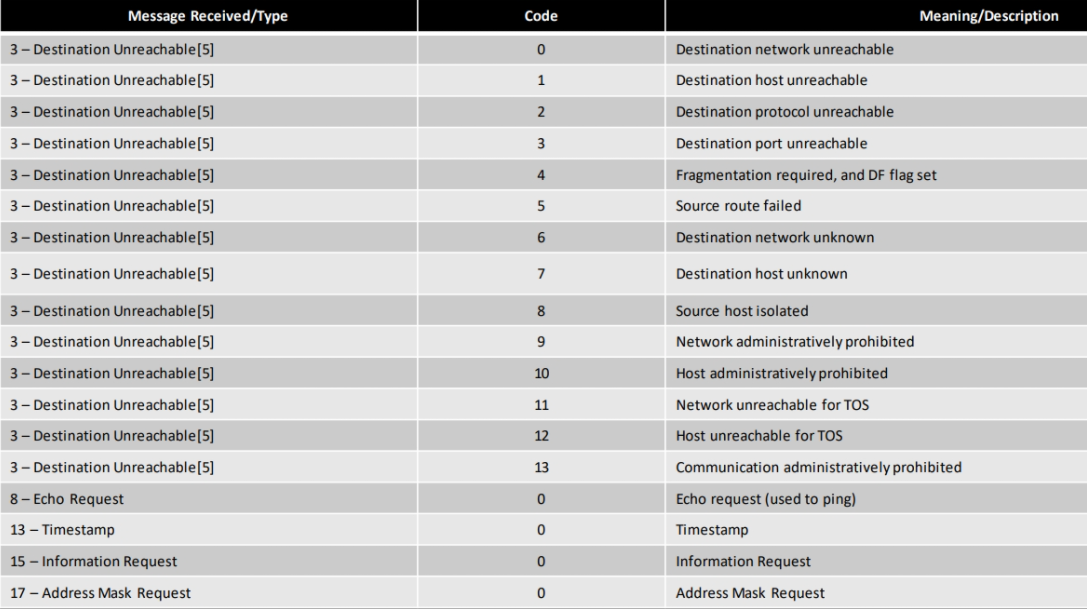
* ICMP Codes
* Enumerate Network by ping multicast | `atk6-alive6`
```bash
## ------------------| Manual
# Check arp cash
arp -n
# ip-neighbour
ip -6 neigh
# Ping to multicast
ping6 -I eth0 ff02::1
# Check ip-neighbour again and arp cash
ip -6 neigh
arp -n
## ------------------| atk6-alive6
which atk6-alive6 <-- copy this binary to remote machine
atk6-alive6 -e ff02::1
ip -6 neigh
```
* ICMP Codes
 ## 01. Nmap
{% hint style="info" %}
if you are using nmap through `proxychains` use -sT -n (Full TCP scan) flags
{% endhint %}
* Nmap debug mode
```bash
sudo nmap -d -packet-trace $IP
sudo nmap -sV -sC -A $IP --script-trace
```
* Host discovery
```bash
sudo nmap -n -Pn -PS -vvv --open -p 22,21,80,443,445,3306 -oN HostDiscovery.nmap 172.25.170.0/24
sudo nmap -n -Pn -PS -vvv --open -p 88,53 -oN DCDiscovery.nmap 172.25.170.0/24
```
* Scan all TCP open ports
```bash
sudo nmap -n -Pn -vv --open -T4 -p- -oN AllPorts.nmap $IP
```
* scan TCP(All) + UDP
```bash
sudo nmap -n -Pn -vv --open -T4 -sU -sS -PS -p U:161,500,4500,T:- -oN AllPorts.nmap IP
```
* Get all open port to variable
```bash
ports=$(cat AllPorts.nmap | grep '^[0-9]' | cut -d '/' -f 1 | tr '\n' ',' | sed s/,$//)
```
* Service scan for only selected open port (using above)
```bash
sudo nmap -sV -sC -Pn -oN DetailPorts.nmap -p $ports $IP
```
* Optimizing UDP scan
```bash
sudo nmap -sUV -T4 -F -vv --version-intensity 0 $IP
```
* Fast UDP scan for common ports
```bash
sudo nmap -n -Pn -vv --open -sU -F -oN UDPFastPorts.nmap $IP
sudo nmap -n -Pn -vv --open -sU -p 53,67,69,111,123,135,137,138,161,177,445,500,631,623,1434,1900,4500 -oN UDPBestPorts.nmap $IP
```
* AV / Firewall bypass
```bash
## ------------------| Decoys
sudo nmap -sS -sV -F -D xxx.xxx.xxx.xxx,xxx.xxx.xxx.xxx -oN nmap-decoys.out $IP
sudo nmap -sS -sV -F -D RND:3 -oN nmap.out $IP
## ------------------| MTU
sudo nmap -sS -sV -F --mtu 16 -D xxx.xxx.xxx.xxx -oN nmap-mtu.out $IP
## ------------------| Fragmentation
sudo nmap -f $IP
## ------------------| BadSum
sudo nmap --badsum $IP
## ------------------| Give source ports
sudo nmap -p- -n -Pn -PS -g 88 $IP
sudo nmap -p- -n -Pn -PS -g 20 $IP
## ------------------| Other
sudo nmap -p- -n -Pn -PS $IP
sudo nmap --script firewall-bypass --script-args firewall-bypass.helper="ftp", firewall-bypass.targetport=22 10.10.10.10 $IP
sudo nmap -p- -sS -Pn -n --disable-arp-ping --packet-trace --source-port 53 $IP
```
* Common usage
```bash
-n : Never do DNS resolution
-vv : Extra verbosity
--open : Output only open ports
-p- : Full TCP ports range (65535)
-T : paranoid (0), sneaky (1), polite (2), normal (3), aggressive (4), and insane (5) (Set a timing template)
-T4 : Aggressive (4) speeds scans; assumes you are on a reasonably fast and reliable netwok
```
* Scripting Engine (NSE)
```bash
sudo nmap --script-updatedb ## Update script
--script filename|category|directory|expression|all
--script "vuln"
## These scripts check for specific known vulnerabilities and generally only report results if they are found
--script "http-*"
## Loads all scripts whose name starts with http-, such as http-auth.nse and http-open-proxy.nse.
## The argument to --script had to be in quotes to protect the wildcard from the shell./
--script "not intrusive"
## Loads every script except for those in the intrusive category.
--script "default or safe"
## This is functionally equivalent to nmap --script "default,safe". It loads all scripts that are in
## the default category or the safe category or both.
--script "default and safe"
## Loads those scripts that are in both the default and safe categories.
--script "(default or safe or intrusive) and not http-*"
## Loads scripts in the default, safe, or intrusive categories, except for those whose names start with http-.
```
```bash
## ------------------| OS Detection, no ping
sudo nmap -Pn -O 10.10.10.10
## ------------------| def scripts, version check
sudo nmap -sC -sV 10.10.10.10
## ------------------| above + All ports
sudo nmap -sC -sV -p- 10.10.10.10
## ------------------| UDP version check
sudo nmap -sU -sV 10.10.10.10
## ------------------| TCP SYN scan <-- does not log in IDS & IPS
sudo nmap -T4 -A -v 10.10.10.10
```
* Tune up performance
```bash
## ------------------| Timeouts (default --min-RTT-timeout 100ms)
sudo nmap 10.10.10.10 -F --initial-rtt-timeout 50ms --max-rtt-timeout 100ms
## ------------------| Max Retries (default --max-retries 1)
sudo nmap 10.10.10.10 -F --max-retries 0
## ------------------| Rates
sudo nmap 10.10.10.10 -F --min-rate 300
## ------------------| Timing (default -T 3)
-T 0 or -T paranoid
-T 1 or -T sneaky
-T 2 or -T polite
-T 3 or -T normal
-T 4 or -T aggressive
-T 5 or -T insane
```
* If you want to install `nmap`
```bash
## ------------------| Download RPM
wget https://nmap.org/dist/nmap-7.92-1.x86_64.rpm
## ------------------| Convert it to deb
alien nmap-xxxx.rpm
## ------------------| Install
dpkg -i nmap-xxxx.deb
```
* Pause and Resume an nmap scan
```bash
## ------------------| Get PID for nmap
ps -aux | grep nmap
## ------------------| Pause (but don't halt/reboot)
kill -SIGTSTP [PID]
## ------------------| Resume
kill -SIGCONT [PID]
###It works with some other processes. If not try to use -SIGSTOP instead of -SIGTSTP.
```
* Use nmap static binary with scripts
```bash
## ------------------| Download Nmap for 64 bit
wget https://raw.githubusercontent.com/andrew-d/static-binaries/master/binaries/linux/x86_64/nmap
```
## 02. Hping
```bash
## ------------------| Port scan
sudo hping3 10.10.10.10 --scan 0-65535 -S | more
```
## 03. Tcpdump
* Basic usage | Always use `tcpdump` with **`sudo`**
```bash
## ------------------| Basic Flags
-D # List interface/devices
-i # Select interface
-n # Do not use DNS names
-c 5 # Captures 5 number of packets and then stops
-s # To change the capture size (-s64 inspect the packet headers only)
-w # Write the output to file
-r # Read pcap file
-X # See the content of the packets in HEX & ASCII format (use -XX to shows the ethernet header)
ip6 # Show only IP6 Traffic
-q # Be less verbose (more quiet) with your output. / Show less protocol information
-t # Give human-readable timestamp output.
-tttt # Give maximally human-readable timestamp output.
-vv # Verbose output (more v’s gives more output).
-S # Print absolute sequence numbers.
-e # Get the ethernet header as well.
-E # Decrypt IPSEC traffic by providing an encryption key.
## ------------------| IP/Range
src # Source IP address
dst # Destination IP address
net # Find packets going to or from a particular network or subnet
## ------------------| Ports
port 53 # Capture DNS traffic for both source or destination
src port 53 # Capture DNS traffic for source
dst port 53 # Capture DNS traffic for destination
portrange 21-23 # Find Traffic Using Port Ranges
```
* Isolate TCP Flags
```
Tcp flag is at offset 13 in the TCP header.
So we can use tcp[13] to filter TCP flags.
+-----+-----+-----+-----+-----+-----+
| URG | ACK | PSH | RST | SYN | FIN |
+-----+-----+-----+-----+-----+-----+
| 32 | 16 | 8 | 4 | 2 | 1 |
+-----+-----+-----+-----+-----+-----+
```
```bash
## ------------------| SYN
sudo tcpdump 'tcp[13] & 2!=0'
sudo tcpdump 'tcp[tcpflags] == tcp-syn'
sudo tcpdump 'tcp[tcpflags] & tcp-syn == tcp-syn'
sudo tcpdump "tcp[tcpflags] & (tcp-syn) != 0"
## ------------------| SYN+ACK
sudo tcpdump 'tcp[13]=18'
sudo tcpdump 'tcp[tcpflags] & (tcp-syn|tcp-ack) == (tcp-syn|tcp-ack)'
sudo tcpdump 'tcp[tcpflags] & tcp-syn == tcp-syn' and 'tcp[tcpflags] & tcp-ack == tcp-ack'
sudo tcpdump 'tcp[tcpflags] & (tcp-syn|tcp-ack) != 0'
## ------------------| ACK
sudo tcpdump 'tcp[13] & 16!=0'
sudo tcpdump 'tcp[tcpflags] == tcp-ack'
## ------------------| PSH
sudo tcpdump 'tcp[13] & 8!=0'
sudo tcpdump 'tcp[tcpflags] == tcp-push'
## ------------------| SYN+RST
sudo tcpdump 'tcp[13] = 6'
## ------------------| FIN
sudo tcpdump 'tcp[13] & 1!=0'
sudo tcpdump 'tcp[tcpflags] == tcp-fin'
## ------------------| RST
sudo tcpdump 'tcp[13] & 4!=0'
sudo tcpdump 'tcp[tcpflags] == tcp-rst'
## ------------------| URG
sudo tcpdump 'tcp[13] & 32!=0'
sudo tcpdump 'tcp[tcpflags] == tcp-urg'
```
* [Tricks](https://danielmiessler.com/study/tcpdump/)
```bash
## --------------------| Show ARP Packets with MAC address
sudo tcpdump -vv -e -nn ether proto 0x0806
## --------------------| Find HTTP User Agents
sudo tcpdump -vvAls0 | grep 'User-Agent:'
## --------------------| Cleartext GET Requests
sudo tcpdump -vvAls0 | grep 'GET'
## --------------------| Find HTTP Host Headers
sudo tcpdump -vvAls0 | grep 'Host:'
## --------------------| Find HTTP Cookies
sudo tcpdump -vvAls0 | grep 'Set-Cookie|Host:|Cookie:'
## --------------------| Find SSH Connections
sudo tcpdump 'tcp[(tcp[12]>>2):4] = 0x5353482D'
## --------------------| Find DNS Traffic
sudo tcpdump -vvAs0 port 53
## --------------------| Find FTP Traffic
sudo tcpdump -vvAs0 port ftp or ftp-data
## --------------------| Find NTP Traffic
sudo tcpdump -vvAs0 port 123
## --------------------| Find Cleartext Passwords
sudo tcpdump port http or port ftp or port smtp or port imap or port pop3 or port telnet -lA | egrep -i -B5 'pass=|pwd=|log=|login=|user=|username=|pw=|passw=|passwd= |password=|pass:|user:|username:|password:|login:|pass |user '
## --------------------| Find Traffic With Evil Bit
sudo tcpdump 'ip[6] & 128 != 0'
```
## 04. Other
* **Port** scan using **`netcat`**
```bash
### If you run nmap scan in brackground, never run this! this will effect to the nmap scan results
for i in {1..65535};do (nc -zvn -w 1 $i 2>&1 | grep -v -i "Connection timed out\|Connection refused"); done
```
* Scan live **hosts** `using bash`
```bash
#!/bin/bash
ip=172.20.0
for i in $(seq 2 255);
do
ping -c 1 -W 1 $ip.$i 1>/dev/null 2>&1
if [[ $? -eq 0 ]];
then
echo "[+] $ip.$i - is Alive!"
fi
done
#### One linner
for i in {1..254}; do (ping -c 1 172.18.0.${i} | grep "bytes from" | grep -v "Unreachable" &); done;
```
* Scan live **ports** `using bash`
```bash
#!/bin/bash
## Run this script like ./portscan.sh 2>/dev/null
ip=127.0.0.1
for port in $(seq 1 65535);
do
echo 1 > /dev/tcp/$ip/$port 1>/dev/null 2>&1
if [[ $? -eq 0 ]];
then
echo "[+] $ip : $port - is Open!"
fi
done
```
```bash
#!/bin/bash
## Run this script like ./portscan.sh 2>/dev/null
ip=127.0.0.1
for port in $(seq 1 65535);
do
timeout .1 bash -c "echo > /dev/tcp/$ip/$port" &&
echo "[+] $ip : $port - is Open!"
done
echo "==========[ Finished ]============"
```
## 05. Advance
### 05.1 Send packet \[python]
{% embed url="" %}
source inc0x0.com
{% endembed %}
* [Sending a self crafted packet](https://inc0x0.com/tcp-ip-packets-introduction/tcp-ip-packets-3-manually-create-and-send-raw-tcp-ip-packets/)
```python
import socket
s = socket.socket(socket.AF_PACKET, socket.SOCK_RAW)
s.bind(("eth0", 0))
ethernet = b'\x00\x0c\x29\xd3\xbe\xd6' # MAC Address Destination
ethernet += b'\x00\x0c\x29\xe0\xc4\xaf' # MAC Address Source
ethernet += b'\x08\x00' # Protocol-Type: IPv4
ip_header = b'\x45\x00\x00\x28' # Version, IHL, Type of Service | Total Length
ip_header += b'\xab\xcd\x00\x00' # Identification | Flags, Fragment Offset
ip_header += b'\x40\x06\xa6\xec' # TTL, Protocol | Header Checksum
ip_header += b'\x0a\x0a\x0a\x02' # Source Address
ip_header += b'\x0a\x0a\x0a\x01' # Destination Address
tcp_header = b'\x30\x39\x00\x50' # Source Port | Destination Port
tcp_header += b'\x00\x00\x00\x00' # Sequence Number
tcp_header += b'\x00\x00\x00\x00' # Acknowledgement Number
tcp_header += b'\x50\x02\x71\x10' # Data Offset, Reserved, Flags | Window Size
tcp_header += b'\xe6\x32\x00\x00' # Checksum | Urgent Pointer
packet = ethernet + ip_header + tcp_header
s.send(packet)
```
### 05.2 Wireshark
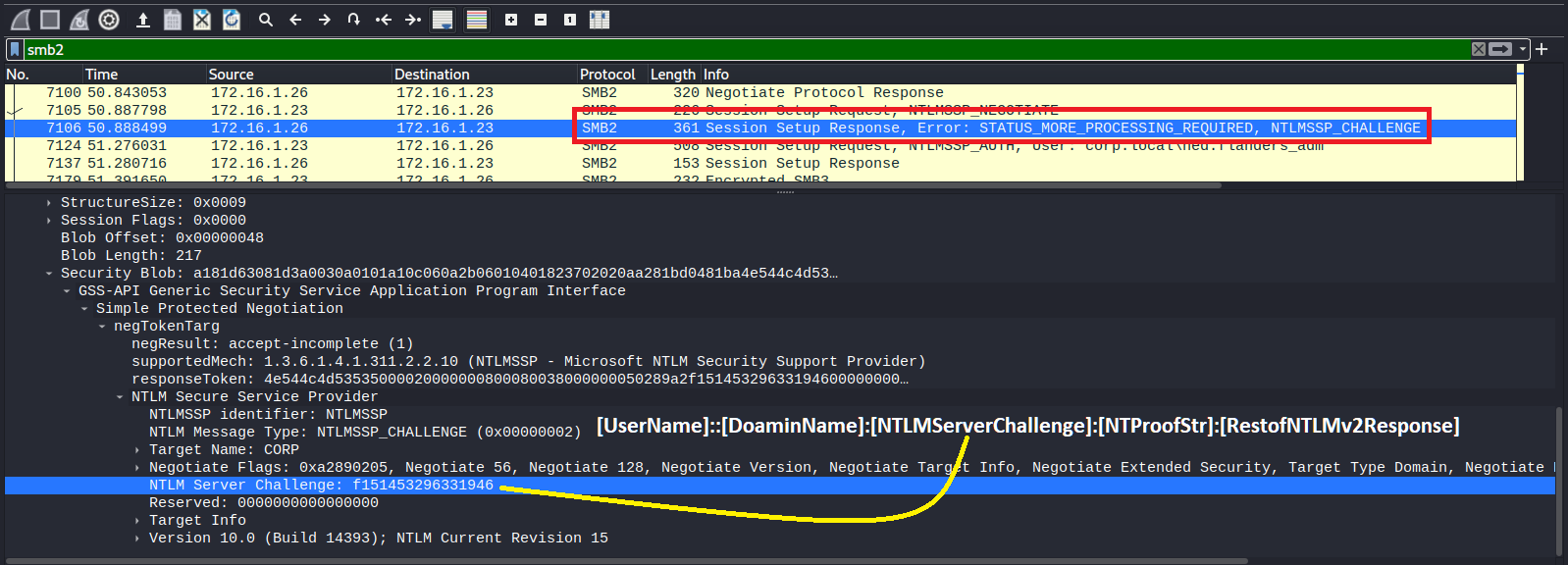
* Create NTML hash using wireshark
```bash
## --------------------| Setup
use filter as "smb2"
## --------------------| NTLM hash structure
[UserName]::[DoaminName]:[NTLMServerChallenge]:[NTProofStr]:[RestofNTLMv2Response]
```
## 01. Nmap
{% hint style="info" %}
if you are using nmap through `proxychains` use -sT -n (Full TCP scan) flags
{% endhint %}
* Nmap debug mode
```bash
sudo nmap -d -packet-trace $IP
sudo nmap -sV -sC -A $IP --script-trace
```
* Host discovery
```bash
sudo nmap -n -Pn -PS -vvv --open -p 22,21,80,443,445,3306 -oN HostDiscovery.nmap 172.25.170.0/24
sudo nmap -n -Pn -PS -vvv --open -p 88,53 -oN DCDiscovery.nmap 172.25.170.0/24
```
* Scan all TCP open ports
```bash
sudo nmap -n -Pn -vv --open -T4 -p- -oN AllPorts.nmap $IP
```
* scan TCP(All) + UDP
```bash
sudo nmap -n -Pn -vv --open -T4 -sU -sS -PS -p U:161,500,4500,T:- -oN AllPorts.nmap IP
```
* Get all open port to variable
```bash
ports=$(cat AllPorts.nmap | grep '^[0-9]' | cut -d '/' -f 1 | tr '\n' ',' | sed s/,$//)
```
* Service scan for only selected open port (using above)
```bash
sudo nmap -sV -sC -Pn -oN DetailPorts.nmap -p $ports $IP
```
* Optimizing UDP scan
```bash
sudo nmap -sUV -T4 -F -vv --version-intensity 0 $IP
```
* Fast UDP scan for common ports
```bash
sudo nmap -n -Pn -vv --open -sU -F -oN UDPFastPorts.nmap $IP
sudo nmap -n -Pn -vv --open -sU -p 53,67,69,111,123,135,137,138,161,177,445,500,631,623,1434,1900,4500 -oN UDPBestPorts.nmap $IP
```
* AV / Firewall bypass
```bash
## ------------------| Decoys
sudo nmap -sS -sV -F -D xxx.xxx.xxx.xxx,xxx.xxx.xxx.xxx -oN nmap-decoys.out $IP
sudo nmap -sS -sV -F -D RND:3 -oN nmap.out $IP
## ------------------| MTU
sudo nmap -sS -sV -F --mtu 16 -D xxx.xxx.xxx.xxx -oN nmap-mtu.out $IP
## ------------------| Fragmentation
sudo nmap -f $IP
## ------------------| BadSum
sudo nmap --badsum $IP
## ------------------| Give source ports
sudo nmap -p- -n -Pn -PS -g 88 $IP
sudo nmap -p- -n -Pn -PS -g 20 $IP
## ------------------| Other
sudo nmap -p- -n -Pn -PS $IP
sudo nmap --script firewall-bypass --script-args firewall-bypass.helper="ftp", firewall-bypass.targetport=22 10.10.10.10 $IP
sudo nmap -p- -sS -Pn -n --disable-arp-ping --packet-trace --source-port 53 $IP
```
* Common usage
```bash
-n : Never do DNS resolution
-vv : Extra verbosity
--open : Output only open ports
-p- : Full TCP ports range (65535)
-T : paranoid (0), sneaky (1), polite (2), normal (3), aggressive (4), and insane (5) (Set a timing template)
-T4 : Aggressive (4) speeds scans; assumes you are on a reasonably fast and reliable netwok
```
* Scripting Engine (NSE)
```bash
sudo nmap --script-updatedb ## Update script
--script filename|category|directory|expression|all
--script "vuln"
## These scripts check for specific known vulnerabilities and generally only report results if they are found
--script "http-*"
## Loads all scripts whose name starts with http-, such as http-auth.nse and http-open-proxy.nse.
## The argument to --script had to be in quotes to protect the wildcard from the shell./
--script "not intrusive"
## Loads every script except for those in the intrusive category.
--script "default or safe"
## This is functionally equivalent to nmap --script "default,safe". It loads all scripts that are in
## the default category or the safe category or both.
--script "default and safe"
## Loads those scripts that are in both the default and safe categories.
--script "(default or safe or intrusive) and not http-*"
## Loads scripts in the default, safe, or intrusive categories, except for those whose names start with http-.
```
```bash
## ------------------| OS Detection, no ping
sudo nmap -Pn -O 10.10.10.10
## ------------------| def scripts, version check
sudo nmap -sC -sV 10.10.10.10
## ------------------| above + All ports
sudo nmap -sC -sV -p- 10.10.10.10
## ------------------| UDP version check
sudo nmap -sU -sV 10.10.10.10
## ------------------| TCP SYN scan <-- does not log in IDS & IPS
sudo nmap -T4 -A -v 10.10.10.10
```
* Tune up performance
```bash
## ------------------| Timeouts (default --min-RTT-timeout 100ms)
sudo nmap 10.10.10.10 -F --initial-rtt-timeout 50ms --max-rtt-timeout 100ms
## ------------------| Max Retries (default --max-retries 1)
sudo nmap 10.10.10.10 -F --max-retries 0
## ------------------| Rates
sudo nmap 10.10.10.10 -F --min-rate 300
## ------------------| Timing (default -T 3)
-T 0 or -T paranoid
-T 1 or -T sneaky
-T 2 or -T polite
-T 3 or -T normal
-T 4 or -T aggressive
-T 5 or -T insane
```
* If you want to install `nmap`
```bash
## ------------------| Download RPM
wget https://nmap.org/dist/nmap-7.92-1.x86_64.rpm
## ------------------| Convert it to deb
alien nmap-xxxx.rpm
## ------------------| Install
dpkg -i nmap-xxxx.deb
```
* Pause and Resume an nmap scan
```bash
## ------------------| Get PID for nmap
ps -aux | grep nmap
## ------------------| Pause (but don't halt/reboot)
kill -SIGTSTP [PID]
## ------------------| Resume
kill -SIGCONT [PID]
###It works with some other processes. If not try to use -SIGSTOP instead of -SIGTSTP.
```
* Use nmap static binary with scripts
```bash
## ------------------| Download Nmap for 64 bit
wget https://raw.githubusercontent.com/andrew-d/static-binaries/master/binaries/linux/x86_64/nmap
```
## 02. Hping
```bash
## ------------------| Port scan
sudo hping3 10.10.10.10 --scan 0-65535 -S | more
```
## 03. Tcpdump
* Basic usage | Always use `tcpdump` with **`sudo`**
```bash
## ------------------| Basic Flags
-D # List interface/devices
-i # Select interface
-n # Do not use DNS names
-c 5 # Captures 5 number of packets and then stops
-s # To change the capture size (-s64 inspect the packet headers only)
-w # Write the output to file
-r # Read pcap file
-X # See the content of the packets in HEX & ASCII format (use -XX to shows the ethernet header)
ip6 # Show only IP6 Traffic
-q # Be less verbose (more quiet) with your output. / Show less protocol information
-t # Give human-readable timestamp output.
-tttt # Give maximally human-readable timestamp output.
-vv # Verbose output (more v’s gives more output).
-S # Print absolute sequence numbers.
-e # Get the ethernet header as well.
-E # Decrypt IPSEC traffic by providing an encryption key.
## ------------------| IP/Range
src # Source IP address
dst # Destination IP address
net # Find packets going to or from a particular network or subnet
## ------------------| Ports
port 53 # Capture DNS traffic for both source or destination
src port 53 # Capture DNS traffic for source
dst port 53 # Capture DNS traffic for destination
portrange 21-23 # Find Traffic Using Port Ranges
```
* Isolate TCP Flags
```
Tcp flag is at offset 13 in the TCP header.
So we can use tcp[13] to filter TCP flags.
+-----+-----+-----+-----+-----+-----+
| URG | ACK | PSH | RST | SYN | FIN |
+-----+-----+-----+-----+-----+-----+
| 32 | 16 | 8 | 4 | 2 | 1 |
+-----+-----+-----+-----+-----+-----+
```
```bash
## ------------------| SYN
sudo tcpdump 'tcp[13] & 2!=0'
sudo tcpdump 'tcp[tcpflags] == tcp-syn'
sudo tcpdump 'tcp[tcpflags] & tcp-syn == tcp-syn'
sudo tcpdump "tcp[tcpflags] & (tcp-syn) != 0"
## ------------------| SYN+ACK
sudo tcpdump 'tcp[13]=18'
sudo tcpdump 'tcp[tcpflags] & (tcp-syn|tcp-ack) == (tcp-syn|tcp-ack)'
sudo tcpdump 'tcp[tcpflags] & tcp-syn == tcp-syn' and 'tcp[tcpflags] & tcp-ack == tcp-ack'
sudo tcpdump 'tcp[tcpflags] & (tcp-syn|tcp-ack) != 0'
## ------------------| ACK
sudo tcpdump 'tcp[13] & 16!=0'
sudo tcpdump 'tcp[tcpflags] == tcp-ack'
## ------------------| PSH
sudo tcpdump 'tcp[13] & 8!=0'
sudo tcpdump 'tcp[tcpflags] == tcp-push'
## ------------------| SYN+RST
sudo tcpdump 'tcp[13] = 6'
## ------------------| FIN
sudo tcpdump 'tcp[13] & 1!=0'
sudo tcpdump 'tcp[tcpflags] == tcp-fin'
## ------------------| RST
sudo tcpdump 'tcp[13] & 4!=0'
sudo tcpdump 'tcp[tcpflags] == tcp-rst'
## ------------------| URG
sudo tcpdump 'tcp[13] & 32!=0'
sudo tcpdump 'tcp[tcpflags] == tcp-urg'
```
* [Tricks](https://danielmiessler.com/study/tcpdump/)
```bash
## --------------------| Show ARP Packets with MAC address
sudo tcpdump -vv -e -nn ether proto 0x0806
## --------------------| Find HTTP User Agents
sudo tcpdump -vvAls0 | grep 'User-Agent:'
## --------------------| Cleartext GET Requests
sudo tcpdump -vvAls0 | grep 'GET'
## --------------------| Find HTTP Host Headers
sudo tcpdump -vvAls0 | grep 'Host:'
## --------------------| Find HTTP Cookies
sudo tcpdump -vvAls0 | grep 'Set-Cookie|Host:|Cookie:'
## --------------------| Find SSH Connections
sudo tcpdump 'tcp[(tcp[12]>>2):4] = 0x5353482D'
## --------------------| Find DNS Traffic
sudo tcpdump -vvAs0 port 53
## --------------------| Find FTP Traffic
sudo tcpdump -vvAs0 port ftp or ftp-data
## --------------------| Find NTP Traffic
sudo tcpdump -vvAs0 port 123
## --------------------| Find Cleartext Passwords
sudo tcpdump port http or port ftp or port smtp or port imap or port pop3 or port telnet -lA | egrep -i -B5 'pass=|pwd=|log=|login=|user=|username=|pw=|passw=|passwd= |password=|pass:|user:|username:|password:|login:|pass |user '
## --------------------| Find Traffic With Evil Bit
sudo tcpdump 'ip[6] & 128 != 0'
```
## 04. Other
* **Port** scan using **`netcat`**
```bash
### If you run nmap scan in brackground, never run this! this will effect to the nmap scan results
for i in {1..65535};do (nc -zvn -w 1 $i 2>&1 | grep -v -i "Connection timed out\|Connection refused"); done
```
* Scan live **hosts** `using bash`
```bash
#!/bin/bash
ip=172.20.0
for i in $(seq 2 255);
do
ping -c 1 -W 1 $ip.$i 1>/dev/null 2>&1
if [[ $? -eq 0 ]];
then
echo "[+] $ip.$i - is Alive!"
fi
done
#### One linner
for i in {1..254}; do (ping -c 1 172.18.0.${i} | grep "bytes from" | grep -v "Unreachable" &); done;
```
* Scan live **ports** `using bash`
```bash
#!/bin/bash
## Run this script like ./portscan.sh 2>/dev/null
ip=127.0.0.1
for port in $(seq 1 65535);
do
echo 1 > /dev/tcp/$ip/$port 1>/dev/null 2>&1
if [[ $? -eq 0 ]];
then
echo "[+] $ip : $port - is Open!"
fi
done
```
```bash
#!/bin/bash
## Run this script like ./portscan.sh 2>/dev/null
ip=127.0.0.1
for port in $(seq 1 65535);
do
timeout .1 bash -c "echo > /dev/tcp/$ip/$port" &&
echo "[+] $ip : $port - is Open!"
done
echo "==========[ Finished ]============"
```
## 05. Advance
### 05.1 Send packet \[python]
{% embed url="" %}
source inc0x0.com
{% endembed %}
* [Sending a self crafted packet](https://inc0x0.com/tcp-ip-packets-introduction/tcp-ip-packets-3-manually-create-and-send-raw-tcp-ip-packets/)
```python
import socket
s = socket.socket(socket.AF_PACKET, socket.SOCK_RAW)
s.bind(("eth0", 0))
ethernet = b'\x00\x0c\x29\xd3\xbe\xd6' # MAC Address Destination
ethernet += b'\x00\x0c\x29\xe0\xc4\xaf' # MAC Address Source
ethernet += b'\x08\x00' # Protocol-Type: IPv4
ip_header = b'\x45\x00\x00\x28' # Version, IHL, Type of Service | Total Length
ip_header += b'\xab\xcd\x00\x00' # Identification | Flags, Fragment Offset
ip_header += b'\x40\x06\xa6\xec' # TTL, Protocol | Header Checksum
ip_header += b'\x0a\x0a\x0a\x02' # Source Address
ip_header += b'\x0a\x0a\x0a\x01' # Destination Address
tcp_header = b'\x30\x39\x00\x50' # Source Port | Destination Port
tcp_header += b'\x00\x00\x00\x00' # Sequence Number
tcp_header += b'\x00\x00\x00\x00' # Acknowledgement Number
tcp_header += b'\x50\x02\x71\x10' # Data Offset, Reserved, Flags | Window Size
tcp_header += b'\xe6\x32\x00\x00' # Checksum | Urgent Pointer
packet = ethernet + ip_header + tcp_header
s.send(packet)
```
### 05.2 Wireshark
* Create NTML hash using wireshark
```bash
## --------------------| Setup
use filter as "smb2"
## --------------------| NTLM hash structure
[UserName]::[DoaminName]:[NTLMServerChallenge]:[NTProofStr]:[RestofNTLMv2Response]
```

 ### 05.3 Zeek
```
## --------------------| Setup
sudo apt-get install zeek
## --------------------| Read pcap file
zeek -Cr file.pcap
## --------------------| Read outputs
less -S conn.log
grep http.log
cat http.log | zeek-cut uri | sort | uniq -c
cat http.log | zeek-cut id.org_h uri host
```
### 05.3 Zeek
```
## --------------------| Setup
sudo apt-get install zeek
## --------------------| Read pcap file
zeek -Cr file.pcap
## --------------------| Read outputs
less -S conn.log
grep http.log
cat http.log | zeek-cut uri | sort | uniq -c
cat http.log | zeek-cut id.org_h uri host
```